

I use CapCut in India, where the app is banned. Recently, I started getting a Safe Mode/security warning when trying to use it. I've never had this issue before, and I'm currently working on an important project.
Has anyone experienced this or knows how to fix it?
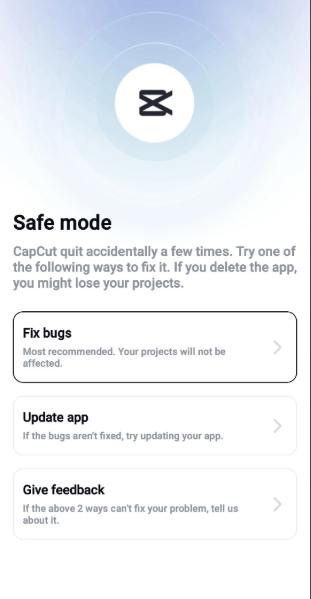

Hi,
From the screenshot, this is CapCut's own "Safe mode" screen, not Android Safe Mode.
It appears when CapCut believes the app has encountered repeated crashes, failed integrity checks, or a security-related problem.
Since you are in India, where CapCut is officially unavailable, it's also possible the app is failing because it can't reliably communicate with its backend services.
Recently, I have read other users from India have reported seeing this exact Safe Mode/Security Notice even after it had worked previously, suggesting it to be related to recent server-side or security changes rather than something wrong with your phone.
Here are the safest things to try without risking your project:
- Tap "Fix bugs" first. CapCut itself says this option should not affect your projects.
- Update CapCut if that option is available. Newer builds sometimes fix crash loops and compatibility issues.
- Restart your phone and try opening the app again.
- Clear only the app cache (not app data):
- Settings → Apps → CapCut → Storage → Clear Cache
- Do not tap "Clear Data" unless you're sure your projects are backed up, because local projects can be lost.
- Avoid uninstalling the app until your project is backed up. Even the Safe Mode screen warns that uninstalling may cause you to lose projects.
If none of those work, the issue may not be fixable on your device alone. Because CapCut is unavailable in India, recent changes to the app's security or service checks could prevent it from working correctly in that region, and several users have reported similar behavior.
To narrow down the cause, could you tell me:
- Android or iPhone?
- What version of CapCut are you using?
- Did this start immediately after updating CapCut?
- Are your projects stored locally or synced to a CapCut account?
That information will help determine whether this is a recoverable app issue or a recent regional/server-side change.