

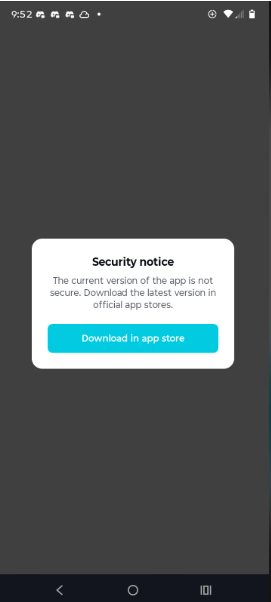
I tried downloading a modded version of CapCut, but I got a security warning. I don't really want to ignore the warning, but I also don't want to install the official version of CapCut.
Has anyone dealt with this before, and what would you recommend?

Hi,
The "Security notice" you are seeing is triggered by CapCut’s built-in integrity verification system.
When you run a modified (modded) version of the app, it fails to match the cryptographic signature of the official version.
CapCut's servers detect this alteration, flag the app as modified or compromised, and block it from connecting to their servers.
If you do not want to install the official version but cannot use the modded version due to this blockade, below is an honest look at your options and the risks involved.
1. Why you can't simply "Bypass" this notice
Even if you find a way to temporarily dismiss the visual pop-up, you will likely find that the app’s online features (like effects, transitions, templates, and cloud storage) still fail to load.
-
Server-Side Checks: Most of CapCut’s assets are hosted on ByteDance’s servers. When the app makes a request to download an effect, the server verifies the app's integrity. If the signature is invalid, the server denies the request.
-
The Warning is Technically Accurate: Modded apps are security risks. Because the code has been cracked by an anonymous third party, it is highly common for malware, adware, or credential-stealing scripts to be injected alongside the "unlocked" features.
2. Recommended Alternatives (If You Won't Use Official CapCut)
If you want premium-level video editing on your phone without paying for CapCut Pro or risking a compromised modded file, consider these excellent, safer alternatives:
Option A: Use Completely Free, High-Quality Competitors
-
VN Video Editor: One of the best free video editors available on mobile. It is incredibly powerful, has a multi-track timeline, does not force watermarks, and offers professional-grade controls (like keyframe animation and curve speed adjustment) completely free.
-
LumaFusion (One-time Purchase): If you are tired of monthly subscriptions, LumaFusion is a highly acclaimed, professional multi-track editor. It requires a one-time purchase rather than a recurring subscription, making it much cheaper in the long run than CapCut Pro.
-
InShot (Free Tier): Very similar to CapCut, and you can remove the watermark on the free tier simply by watching a short ad.
Option B: Use CapCut Web (In Your Browser)
If you still want the CapCut ecosystem but don't want the app installed on your phone, you can use CapCut's official web editor via your mobile or desktop browser. The web-based version runs directly on CapCut cloud, bypasses local app verification issues, and offers a robust suite of free tools.
Option C: Reconsider the Official CapCut (Free Tier)
If your hesitation to download the official version is because of watermarks or paywalls, it is worth noting:
-
No Watermark: You can easily remove the CapCut watermark on the official free version by simply tapping the "Ending" clip at the end of your timeline and hitting Delete before you export.
-
Massive Free Library: The vast majority of CapCut's core tools (cutting, keyframing, basic masking, and chrome key) are entirely free without needing the "Pro" upgrade.
-
A Word of Warning: Avoid downloading older versions of modded APKs that claim to "fix" this security notice. These older versions are highly prone to crashing, miss out on critical security patches, and will eventually be entirely deprecated by CapCut's servers.