

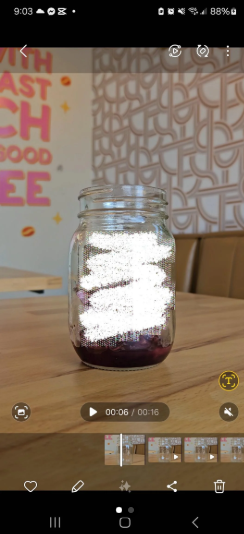
I'm having a really frustrating issue with the Draw tool. Everything looks great while I'm editing in the app, but after exporting the video, it's like there's a fishnet or grid pattern over my drawings, which noticeably reduces the quality.
I've searched online and tried several different export settings, but nothing seems to fix the problem.
Has anyone else experienced this? If so, were you able to resolve it? Any recommendations would be greatly appreciated.

Hi,
Yes this is something a lot of CapCut users have run into, particularly when using the Draw or Doodle tool.
If the drawing looks clean inside the editor but exports with a grid, fishnet, or checkerboard pattern, it's usually not caused by your export bitrate or resolution. It's more a rendering issue with how CapCut processes the drawing layer.
Here are the things you can try, in roughly the order of success:
- Update CapCut to the latest version. Some versions have had rendering bugs with the Draw tool.
- Export at the project's native resolution. For example, if you're editing in 1080p, don't export at 4K, and vice versa.
- Turn off HDR or Smart HDR (if your phone supports it). Sometimes HDR processing creates artifacts on graphics and overlays.
-
Flatten the drawing before the final export.
- Export a version containing only the drawing.
- Import that exported clip back into a new project.
- Export again.
This forces CapCut to treat the drawing as part of the video instead of re-rendering the vector strokes.
- Use a PNG overlay instead of the Draw tool.
If the drawings are important, creating them in another app (such as ibisPaint, Procreate, or even Samsung Notes) and importing them as transparent PNGs often avoids this issue completely. - Clear CapCut's cache and restart the app. Corrupted cached render data can occasionally cause strange export artifacts.
Looking at your screenshot, the white scribble over the jar appears heavily pixelated in the preview you shared, but because it's a screenshot of the playback screen, we can't tell whether the grid is actually in the exported video or if it's compression from the screenshot itself.
A couple of questions that would help narrow it down:
- What phone are you using? (Samsung, Pixel, iPhone, etc.)
- Android or iPhone?
- What version of CapCut?
- Does the grid appear:
- only in the exported file,
- or even after you upload it to TikTok/Instagram?
- Are you using the Draw/Doodle tool, or a brush effect from another feature?
If you can upload:
- a short exported clip (or a crop showing the artifact), or
- a zoomed-in frame where the fishnet pattern is visible,
We can usually tell whether it's a CapCut rendering bug, video compression, or an issue with the brush itself.