

I'm running into this issue with all of my projects. Whenever I take a break, I make sure the project is saved and shows up on the home screen before closing the app, planning to come back and finish it later.
But when I reopen the project, the entire video is replaced with the message:
"Video or photo is deleted or moved in your device. Recover it in your album."
I haven't deleted or moved any of the files, so I'm not sure what album it's referring to or how to recover them.
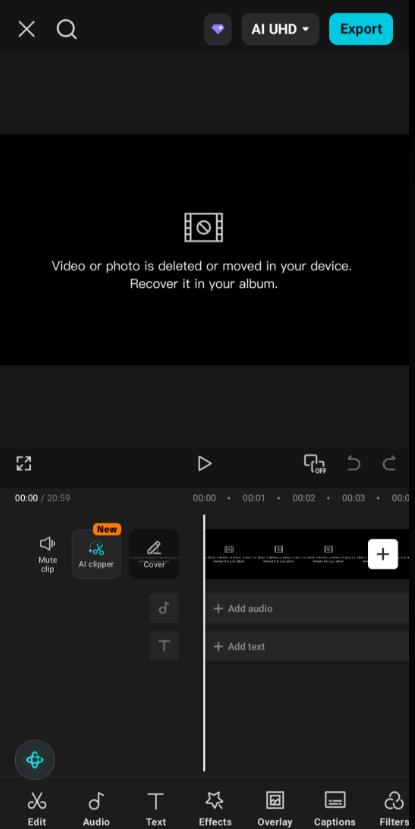
Has anyone else had this happen or know how to fix it? Any help would be greatly appreciated. Thanks!

Hi,
From what I can see from your screenshot, CapCut isn't saying the project is gone it is saying the original media file that the project references can't be found.
This is unusual if it happens to every project after you close the app, because normally CapCut keeps working as long as the original videos remain in the same location.
Here are the most likely causes, in order of chance of happening:
1. Your phone is cleaning temporary files
If your videos came from:
-
WhatsApp
-
Telegram
-
Instagram
-
Downloads
-
Screen recordings stored in a temporary folder
Android or the app itself may delete cached files after some time.
Fix:
-
Move videos into a permanent folder like DCIM, Movies, or Pictures before importing them into CapCut.
-
Don't edit directly from messaging apps.
2. CapCut lost permission to access your photos/videos
This can happen after an update or if permissions changed.
Check:
-
Settings → Apps → CapCut → Permissions
-
Make sure Photos & Videos (or Storage) is allowed.
-
If you're on Android 13+, choose Allow all photos and videos, not just selected ones.
3. Your files are on an SD card
If your videos are stored on an SD card:
-
removing it
-
restarting the phone
-
SD card disconnecting
can make CapCut think the files disappeared.
Try moving your editing footage to internal storage.
4. Cloud Gallery optimization
Some phones (Samsung, Xiaomi, Huawei, etc.) automatically offload local photos to cloud storage.
The project still exists, but the original file is no longer physically on the device.
5. CapCut cache or project database corruption
If every project breaks after reopening, the app itself may be corrupted.
Try:
-
Back up your projects if possible.
-
Clear CapCut cache (not data).
-
Update CapCut.
-
If already updated, reinstall CapCut (only after ensuring projects are backed up).
"Recover it in your album"
It simply means: "Locate the original video again."
If the file still exists somewhere on your phone, tapping it lets you relink it.
If the file is actually gone, CapCut cannot restore it because it doesn't embed the original video into the project.
Since this happens with all projects...
This points more toward a device or permission issue than individual missing videos.
I would check these first:
-
Are you using Android or iPhone?
-
Are the source videos stored in Downloads, WhatsApp, Telegram, or an SD card?
-
Did this start after a CapCut update or a phone update?
If you tell me the below details
-
your phone model (Samsung, Xiaomi, Pixel, etc.),
-
your Android/iOS version, and
-
where the videos originally come from,
I can narrow down the exact cause and give you the most likely fix.