

I recently purchased a CapCut Pro subscription, but I'm still unable to export my project. It's acting as if I don't have Pro, even though my subscription is active.
Has anyone else experienced this issue? Is there something I need to do, like restore my purchase, sign out and back in, or wait for the subscription to sync?
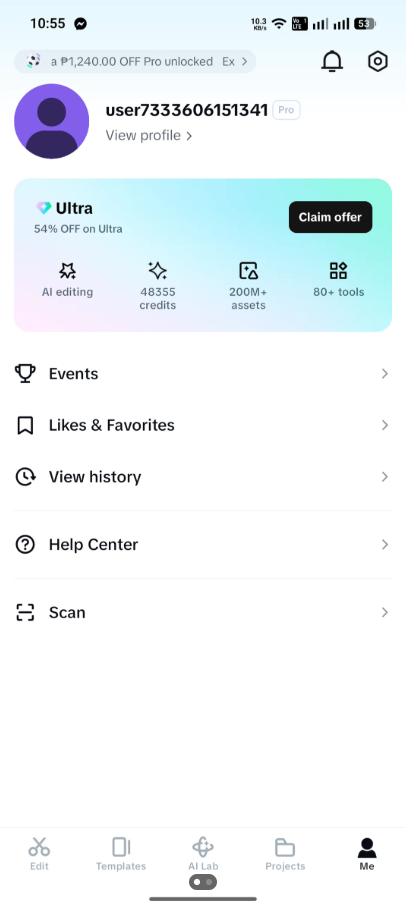

Hi,
From your screenshot, it looks like your CapCut account does have Pro as I can see there is a "Pro" badge next to your username and the profile shows Pro benefits. However, the unusual thing is that PRO symbol is not highlighted which usually is the case.
Here are the most common fixes:
- Make sure you're exporting while logged into the same account that purchased Pro. Sometimes projects are opened under a different account.
- Check whether your project contains internet-dependent assets. If a Pro effect, font, or template hasn't finished downloading, export can fail.
- Restart the app and try exporting again.
- Update CapCut to the latest version from your device's app store.
- Restore your purchase:
- Go to Profile → Settings → Restore Purchase (if you purchased through Google Play or the App Store).
- Clear CapCut's cache (not your project data, if possible) and try again.
- Try a lower export resolution, such as 1080p instead of 4K, in case the issue is related to your device's resources.
To narrow it down, could you tell me as a reply to this thread:
- What happens when you tap Export?
- Does it say you need Pro?
- Does it get stuck?
- Does it show an error message? If so, what does it say exactly?
- Are you using Android or iPhone?
- Did you buy Pro through Google Play/App Store or directly in CapCut?
A screenshot of the export error message would also help identify the exact cause.