

I'm trying to get rid of this strong yellow hue in my wrestling footage, but I'm having no luck.
I've already tried a bunch of filters and different color grading adjustments in CapCut, but I can't seem to neutralize the yellow without making the rest of the image look off.
The attached image is the original, unedited frame from the video.
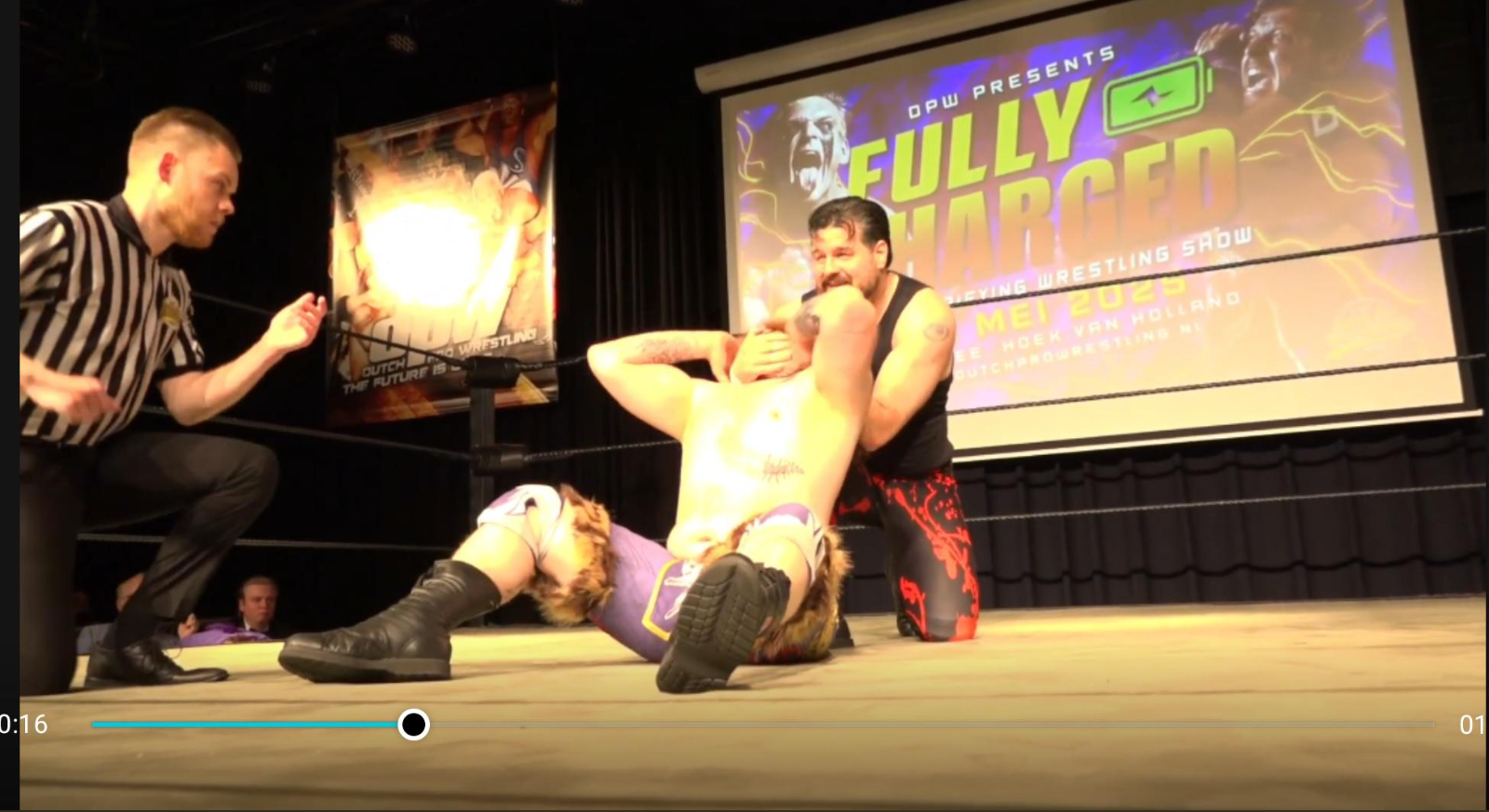
Does anyone have any advice on:
- Which color adjustments I should focus on (white balance, temperature, tint, HSL, curves, etc.)?
- Whether this is something that can realistically be fixed in CapCut, or if I'd need a more advanced editor like DaVinci Resolve?
- Any workflow or settings you'd recommend for correcting this kind of lighting?
Any tips would be greatly appreciated. Thanks!

Hi,
Looking at your frame, I don't think you're dealing with a simple white balance problem.
The footage appears to have been shot under very warm stage lighting, and there are also blown-out highlights (especially on the wrestler in the foreground). Those two things make complete correction impossible because some color information has already been lost.
A few things stand out:
- The entire image has a strong yellow/orange bias.
- The referee's white stripes are warm instead of neutral, which confirms the lighting isn't white.
- The skin on the wrestler in the center is clipped so heavily that there's very little color information left to recover.
What I would adjust first
I would work in roughly this order:
- White Balance / Temperature
- Reduce Temperature significantly (move toward blue).
- If the image starts looking slightly green, add a little magenta Tint.
- Highlights
- Lower highlights before worrying about color.
- This won't restore clipped detail, but it can make the image look less harsh.
- HSL
- Reduce Yellow Saturation by about 20–40%.
- Shift Yellow Hue slightly toward orange or green depending on what looks more natural.
- Sometimes reducing Orange Saturation a little also helps because skin is being contaminated by the yellow light.
- Curves
Instead of using the global temperature slider alone:- Lift the Blue curve slightly in the midtones.
- Pull down the Red curve a touch.
- Leave the shadows mostly alone unless they also look yellow.
CapCut vs. DaVinci Resolve
CapCut can probably get you 70–80% of the way there with:
- Temperature/Tint
- Curves
- HSL
The limitation is that CapCut's color tools are fairly basic.
DaVinci Resolve gives you much more control, especially:
- Offset (overall white balance)
- Color wheels
- Qualifiers to isolate yellows
- Hue vs Hue
- Hue vs Sat
- Hue vs Luma
- Better highlight recovery
Those tools make stage lighting much easier to tame.
One important limitation
The brightest areas on the wrestler's chest and shoulders look overexposed. Once a channel clips, you can't truly recover the original skin tone.
So if you're trying to make those highlights look completely natural, no software can recreate color that the camera never recorded.
My suggested workflow
- Lower highlights.
- Cool the white balance until the referee's shirt looks close to white.
- Add a small amount of magenta tint if the image becomes greenish.
- Reduce yellow saturation.
- Fine-tune with RGB curves.
- Add a small amount of contrast at the end.
For future wrestling shoots
This kind of footage is common with independent wrestling because venues often use tungsten or amber LED stage lights. If you have control of the camera:
- Shoot in a flatter profile if available.
- Expose to protect highlights.
- Set a manual white balance instead of Auto WB.
- Record in 10-bit if your camera supports it.
That gives you much more latitude in post.
If you can upload a 5–10 second clip or tell me what camera/phone you used, I can suggest much more specific CapCut or Resolve settings, including approximate Temperature, Tint, and HSL values that should work well for this exact lighting.