

I'm having an issue with the text spacing in CapCut. I never changed any of the text settings, but all of a sudden my captions started looking like this, with the words spaced out incorrectly. It looks really ugly compared to how it used to be.
I mostly make TikToks using specific scenes from TV shows, and this just started happening out of nowhere. I've attached screenshots showing what it looks like now and what it used to look like.
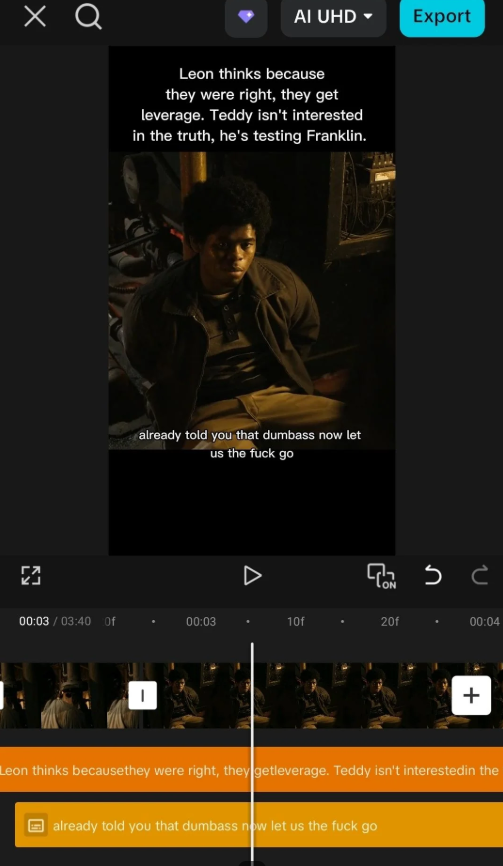
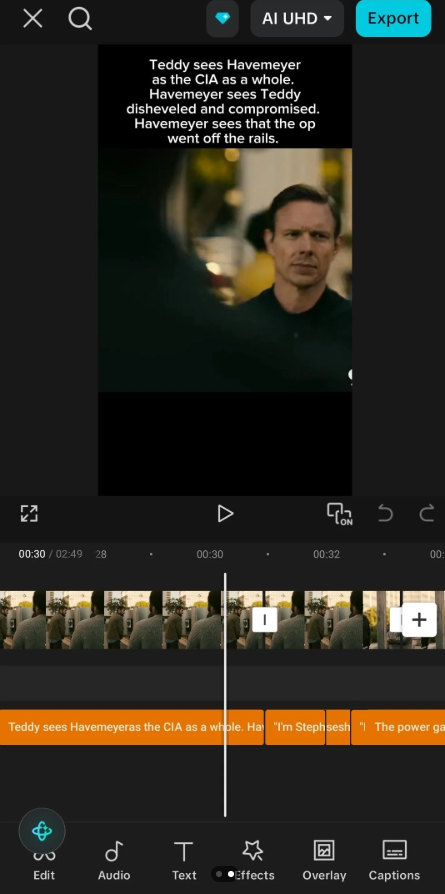
Does anyone know what could have caused this or how I can get the text spacing back to normal?

Hi,
From your screenshots, this doesn't seem to be a font issue.
Instead, it looks like the text is being justified or the text box has been stretched, causing CapCut to distribute extra space between words.
Here are a few things to check:
- Select one of the affected captions.
- Go to Text → Style or Format (the exact location depends on your version of CapCut).
- Check the alignment setting.
- If it's set to Justify, change it to Center or Left.
- Also check the following:
- Character (letter) spacing: Reset it to 0.
- Line spacing: Reset it to the default value (typically around 1.0 or 100%).
- Text box width: If the text box has been stretched very wide, reduce its width so it better fits the text.
If you are using Auto Captions
CapCut occasionally changes the default caption style after an update.
- Create a new Auto Caption style or tap Reset in the text style menu.
- Delete one affected caption and regenerate it to see if the problem persists.
- If every newly generated caption has the same issue, it's likely caused by the default style or a bug rather than your project.
If the Problem Started Suddenly
This can be caused by:
- a recent CapCut update changing the default caption style,
- an accidentally saved text preset, or
- a temporary application bug.
If none of the settings above resolve the issue:
- Restart CapCut.
- Clear CapCut's cache (avoid clearing project data unless it's backed up).
- Update to the latest version. If the issue started immediately after an update, consider reinstalling an earlier version if that's available for your device.
One Question
To help narrow down the cause:
- Are you using Auto Captions or manual text boxes?
- Are you using Android, iPhone, or the desktop version of CapCut?