

I'm honestly panicking right now.
I've been working on this project all day yesterday and all day today—around 14+ hours of work—and it appears to be completely gone.
My project is stored in CapCut Cloud Spaces, and I'm using the CapCut app on my Mac.
Here's what happened:
- My Mac started overheating and eventually froze.
- Right before it froze, I noticed CapCut displayed "Saved" in the top-left corner.
- I restarted my computer.
- When I reopened CapCut and tried to open my project, I got a strange popup where both options were simply labeled "none."
- Wanting to get back to work, I clicked the blue "none" button.
- The project opened, and I made a small edit before realizing it had reverted to yesterday's version. Every change I'd made over the last two days was missing.
- To make matters worse, the project now says "Created xx minutes ago," which makes me worry it overwrote the original project.
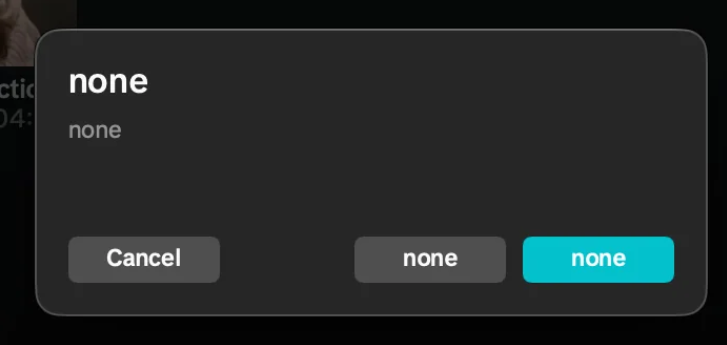
I closed CapCut and reopened it, and the same "none" popup appeared again.
Has anyone seen this before? Is there any way to recover the newer version of my project from CapCut Cloud, local cache, or anywhere else?
This project is a gift for my friends, and I really don't have enough time to recreate 14+ hours of editing from scratch.
Any advice or suggestions would be greatly appreciated. Thank you.

Hi,
That screenshot is unfortunately consistent with CapCut failing to render the labels for a conflict-resolution dialog, not with your project necessarily being deleted.
From what you described:
- Your Mac froze while CapCut was open.
- CapCut had shown "Saved", but that doesn't guarantee the cloud upload had finished.
- After restarting, CapCut displayed the mysterious "none / none" dialog.
- You clicked the blue option.
- The project opened as an older version.
- It now says "Created xx minutes ago."
The biggest concern is that clicking one of those options may have caused CapCut to create or sync a new project state, but it does not necessarily mean your newer edits are permanently gone. There are still a few places they could exist.
1. Stop using that project immediately
This is the most important step.
Every time you open and edit the project, CapCut may synchronize the older version back to the cloud or overwrite cached data.
I'd avoid opening it again until you've tried recovery.
2. Check CapCut Cloud from a browser
Don't rely only on the Mac app.
Log into your CapCut account in a web browser and check:
- Cloud Spaces
- Drafts
- Recently edited projects
- Trash/Deleted (if available)
Sometimes the cloud copy and the desktop cache become out of sync.
3. Look for local project caches
On macOS, CapCut stores caches locally. Common locations include:
~/Library/Application Support/CapCut/or
~/Movies/CapCut/or
~/Library/Containers/Look for folders named things like:
- Drafts
- Projects
- Cache
- User Data
Don't delete anything. If you find them, make a complete copy of the folders before experimenting.
4. Check whether multiple drafts exist
Sometimes after a sync conflict CapCut creates:
- Project
- Project (1)
- Recovered Project
- Untitled Draft
instead of replacing the original.
Sort your projects by Last Modified.
5. Check if Cloud Space has version history
Some cloud services keep previous versions even if the latest appears older. If CapCut Cloud offers version history for your account, that would be the best recovery option.
About the "none" popup
Your screenshot looks like a dialog where the text failed to load.
Normally this type of dialog would have buttons similar to:
- Keep Local Version
- Keep Cloud Version
- Cancel
Instead, every label rendered as "none", which suggests a UI or localization bug rather than an intentional message.
If nothing works
I'd contact CapCut support before continuing to use the project, because if the newer edit still exists on CapCut servers they may have a chance to recover it.
A few questions that could narrow this down:
- Which version of macOS are you using?
- Which version of CapCut (desktop version number)?
- Was this project Cloud Space only, or did you also have a local draft?
- After reopening, did the timeline revert to yesterday's exact state, or was it completely empty?
- Have you quit CapCut since seeing the problem, or has it only been restarted once?
Those details will help determine whether this is more likely a cloud sync conflict, a corrupted local cache, or an overwritten draft.