
error code: 2_2_301...
 
Notifications
Clear all

error code: 2_2_301 _- 6

5 Posts
3 Users
0 Reactions
2,184 Views
Posts: 1
Topic starter
(@accvip100v89)
New Member
Joined: 3 months ago

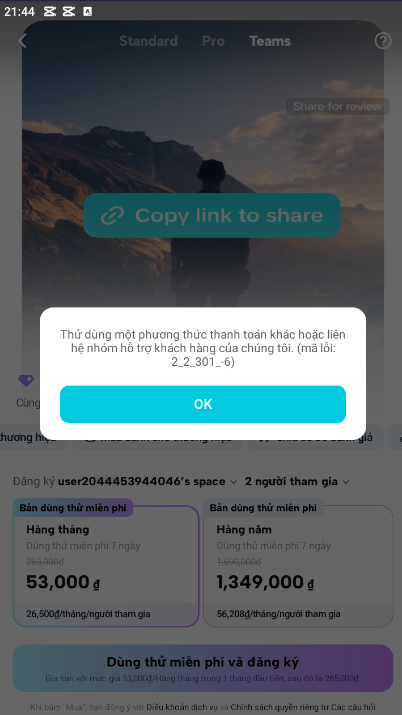
Hello, can someone help me? I have an account that I've never registered with Capcut before. But when I click to register, it gives me error code: 2_2_301_-6. I've added two of my personal cards and one of my friend's cards, but they all show errors. It even showed errors before I added the cards, so I'm really stuck. Can anyone help me?
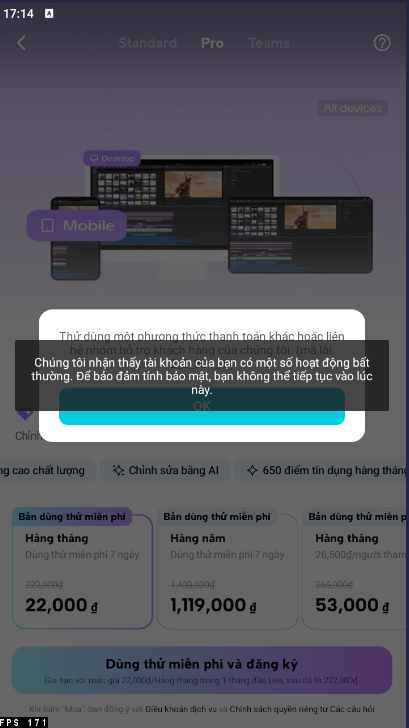
Screenshot 2026 04 15 171459
Screenshot 2026 04 15 214455

4 Replies
CapCut Edit
Posts: 1060
Admin
(@admin)
Member
Joined: 2 years ago

Hi,

That error isn’t actually about your cards as it’s CapCut blocking the account/payment attempt itself.

The message in your screenshot says: "Your account has unusual activity. For security reasons, you can’t continue right now.”

“Try another payment method or contact support (error code: 2_2_301_-6)”

What this means for you:

Error 2_2_301_-6 happens when CapCut’s system flags:

  • A new or suspicious account
  • Too many payment attempts
  • Region/IP mismatch
  • Or device/network flagged (VPN, emulator, etc.)

That’s why:

  • It failed even before adding cards
  • Multiple cards didn’t help

What you should try now:

1. Stop retrying for now

Repeated attempts can make the block stricter. Wait 12–24 hours before trying again.

2. Check your connection

  • Turn OFF VPN
  • Switch between:
    • WiFi ↔ Mobile data
  • Make sure your region matches your account country

3. Use a different method (important)

Instead of adding cards inside CapCut:

  • Try paying via:
    • Google Play (Android)
    • App Store (iPhone)

This can bypass CapCut’s internal payment filter.

4. Try a different device

  • Log in on another phone or tablet
  • Avoid emulators or rooted devices

5. Verify account info

Make sure:

  • Email or phone is verified
  • No fake/temporary info used

6. Contact CapCut support

Since it flagged your account as “unusual activity,” you may need CapCut support to remove the block.

Go to:

  • CapCut app → Settings → Support / Feedback

Or email:

Include:

  • Error code: 2_2_301_-6
  • Screenshot (like the ones you have attached here)

Important things to notice here:

This is not a payment failure as it is mostly a security restriction.

If the account is flagged, no card will work until the flag is lifted.

To help you further can you mention the below details:

  • Your country
  • If your are using Android or iPhone
  • Whether you used VPN or emulator

We can narrow down the exact cause and give a more precise fix.


Reply
2 Replies
(@Ibend)
Joined: 2 months ago

Posts: 1

@adminBut when I used a new Google account and a new payment method in Indonesia, when I wanted to claim the 7-day Teams trial, it remained the same on all the phones I had.


Reply
CapCut Edit
Admin
(@admin)
Joined: 2 years ago

Member
Posts: 1060

If it happens across:

  • multiple phones,
  • a brand-new Google account,
  • different cards/payment methods,
  • and before payment is even processed,

then the problem is not the card or Google account.

CapCut or ByteDance is flagging one of these:

  • your IP/network
  • your region setup
  • your device fingerprint
  • or abuse detection around the Teams free trial

The “Teams” trial is much more aggressively protected than normal Pro subscriptions because many people repeatedly create accounts for free trials.

Most likely causes in your case

1. Indonesia region mismatch

CapCut checks combinations like:

  • Google Play country
  • SIM country
  • IP country
  • billing country
  • device locale/timezone

If one says Vietnam and another says Indonesia, their system can auto-block the trial.

Example:

  • Indonesian VPN/IP
  • but Vietnamese SIM
  • or Vietnamese Google Play profile
  • or Vietnamese-issued card

→ often triggers “unusual activity”.

2. Your network/IP is already flagged

Even with new accounts, using:

  • the same Wi-Fi,
  • same mobile network,
  • same VPN node,
  • or same public IP

can keep triggering the block.

This is extremely common with:

  • Indonesian VPN servers
  • cloud/VPS IPs
  • shared mobile carrier NATs

3. Device fingerprinting

CapCut can still recognize:

  • Android ID
  • Play Integrity data
  • advertising ID
  • rooted/unlocked devices
  • emulators/cloned apps

So “new account” alone is not enough.

What actually works

Option A — easiest

Skip the Teams trial entirely.

Try:

  • regular CapCut Pro monthly subscription
  • through Google Play billing

The Teams trial system is stricter than direct subscriptions.

Option B — fully clean setup

If you still want the trial:

You need ALL of these aligned:

  • Fresh device (or factory reset)
  • No VPN
  • Indonesian IP
  • Indonesian SIM
  • Indonesian Play Store region
  • Indonesian billing profile
  • Indonesian-issued payment method
  • New CapCut account
  • Wait 24–48h before attempting payment

If even one thing mismatches, their fraud system may reject it.

Option C — use web subscription

Sometimes the mobile app blocks but the website works.

Try:

  • browser on PC
  • different network
  • login there first
  • then subscribe

Do not keep rapidly retrying. Repeated failures increase the risk score and can temporarily shadow-ban attempts for several days.


Reply
Posts: 1
 NS
(@NS)
Joined: 3 months ago

Getting the same exact error. Logged off VPN, tried different desktops and phones. Nothing works. Every time I try make a purchase I get this error.  When does the blocking expire? 

Ridiculous to have worked on a project for hours and they restrict exporting until you pay - a feature you can't access because of this block. 


Reply

Leave a reply

Author Name

Author Email

Title *

or drag and drop it here. Max file size 256MB
 
Preview 0 Revisions Saved
Share:
Scroll to Top