

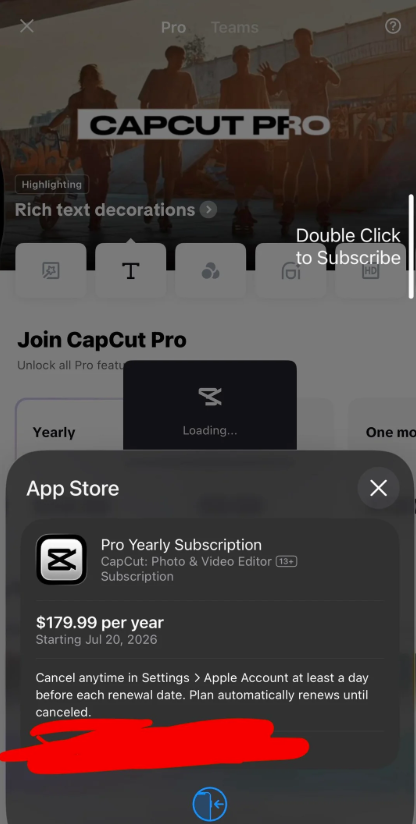
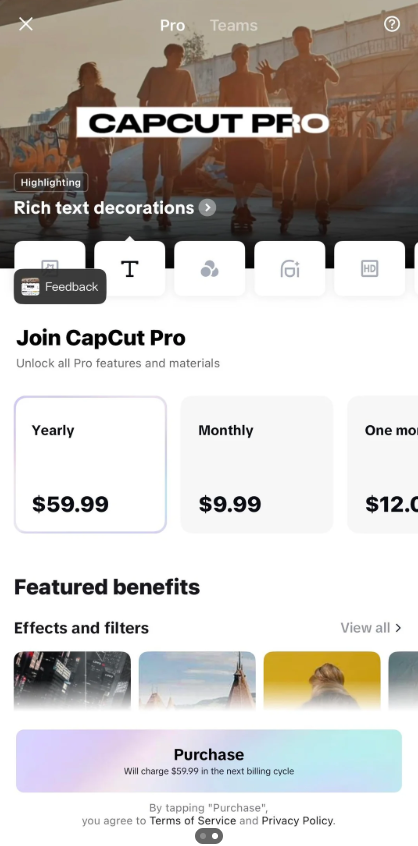
When I open the CapCut Pro subscription page, it shows the Yearly plan for $59.99. However, after I tap Purchase, the Apple App Store confirmation pops up and shows $179.99 per year instead.
I've attached screenshots showing both prices. Does anyone know why this is happening or how to fix it?

Hi,
From your screenshots, the mismatch is clear:
- CapCut subscription page: Yearly – $59.99
- Apple purchase confirmation: $179.99/year
The important point is that Apple's purchase confirmation shows the amount you would actually be charged if you complete the purchase.
If the confirmation screen says $179.99/year, that is the price Apple will bill.
This can happen for several reasons:
- The $59.99 price is a promotional offer. CapCut sometimes displays discounts that are only available to eligible accounts.
- The app is showing outdated or incorrect pricing. In some cases, the in-app price doesn't match the current App Store price because of cached data or a recent pricing update.
- Your App Store region is different. If your Apple ID country or region differs from the one the app expects, the checkout price may be different.
In Your Case
A difference between $59.99 and $179.99 is much larger than what would normally be explained by taxes alone. It more likely indicates that:
- the app is displaying an outdated or promotional price, or
- your account isn't eligible for the $59.99 offer.
Generally from user feedbacks CapCut is priced differently by region. Countries like US, UK, Canada usually pays the highest while some countries in Asia are charged very low prices to suit the market.
What you should do now:
- Do not tap "Confirm" unless you're willing to pay $179.99 per year.
- Check your Apple ID country/region by going to Settings → Apple ID → Media & Purchases → View Account → Country/Region.
- Update CapCut to the latest version and restart the app.
- Contact CapCut Support and include both screenshots, as they clearly show the pricing discrepancy.
One question that can help narrow down the cause:
Which country or region is your Apple ID set to (for example, the United States, Canada, or Australia)? That can help determine whether this is a regional pricing issue or an incorrect price being displayed in the app.