

I've been trying to export my video for the past 3 hours, and nothing seems to work.
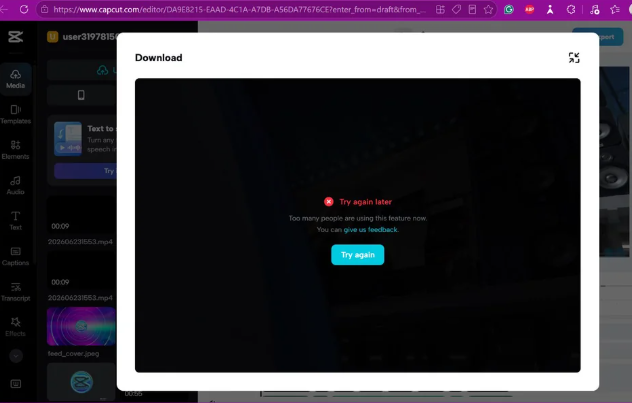
I also tried using both my phone and the CapCut desktop app, but they force me to open the project on the website. Unfortunately, every time I try to export from the website, it fails with an error.
I actually had the same issue about two weeks ago, so unless I just keep accessing the website during server issues, I don't think the error message is accurate.
Has anyone experienced this before or knows how to fix it? Any help would be greatly appreciated. Thank you!

Hi,
From your screenshot I can see that CapCut Web is showing:
- "Try again later"
- "Too many people are using this feature now."
If this has happened repeatedly over the last two weeks, it's unlikely that you've simply been unlucky enough to hit server overload every time.
The message is probably being used as a generic export failure rather than describing the real cause.
Here are the things you can try to get this issue resolved:
- Duplicate the project.
- Go back to the project list.
- Duplicate the project.
- Open the copy and try exporting that instead.
- Sometimes a project becomes corrupted while editing.
- Reduce the export workload.
- Try exporting at 720p instead of 1080p/4K.
- Lower the frame rate (30 fps if you're using 60 fps).
- If the project is long, split it into two exports.
- Look for problematic media.
- Replace any recently added videos, audio, or effects.
- If you imported footage from another editor or downloaded assets, one file may be causing the render to fail.
- If possible, create a new project and import just the timeline (or rebuild a short section) to see whether it exports.
- Test with a tiny project.
- Create a brand-new project with one image or a 5-second clip.
- If that exports successfully but your main project doesn't, the issue is almost certainly with the project rather than your account or browser.
- Try an Incognito/Private window and disable:
- Ad blockers
- Privacy extensions
- VPNs
- Browser extensions that modify websites
- Check browser storage.
- CapCut Web relies on local browser storage while editing.
- If your browser storage is full or corrupted, exporting can fail.
- If your project is synced to your account, clearing CapCut's site data (after confirming everything is uploaded) can sometimes help.
Below are my observations from your case:
- It fails on the website
- The desktop app redirects you back to the website
- Your phone also ends up using the website
- This has happened before
This indicates an issue with your specific web project, your account, or CapCut's web export service than with your computer.
Can you help me with the below information:
- Approximately how long is the video?
- What resolution are you exporting (720p, 1080p, 4K)?
- Does every project fail, or only this one?
- Is your CapCut account Free or Pro?
- Does the error appear immediately, or does it render for a while before failing?
Those answers will make it much easier to determine whether this is a project corruption issue, an account limitation, or a problem with CapCut's web exporter.