

Hi everyone.
I've looked through some platform but couldn't find the answer. I am able to copy the project folder from Windows to my iMac but it can't be opened. I have tried to change the permission, move out the Projects folder and move it back, rename, restart the capcut, but still it doesnt work.
I can see the folder on my capcut project list but can't do anything about it. When tried to duplicate it said unsual path or version.
Anyone have this issue before? Thank you so much for your assistance.
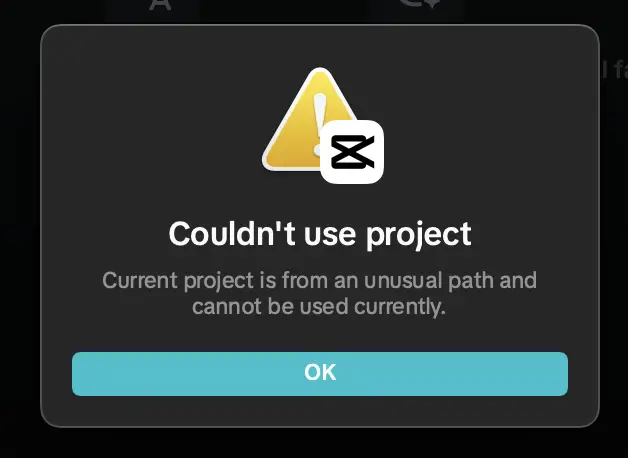

Hi,
You are moving a CapCut desktop project from Windows to macOS, and CapCut is detecting it as coming from an “unusual path” or incompatible version.
This happens because CapCut desktop projects are not fully cross-platform compatible just by copying the project folder.
The project database and file paths are stored differently between Windows and macOS.
Why is this happening?
-
Different file path formats
-
Windows uses:
C:\Users\... -
macOS uses:
/Users/... -
CapCut saves absolute paths in project files.
-
-
Different CapCut versions
-
If Windows and Mac versions are different builds, it may refuse to open.
-
-
Project database mismatch
-
CapCut keeps project info in a hidden database, not just the folder you copied.
-
-
Missing cache/proxy files
-
Sometimes required metadata doesn’t transfer properly.
-
Recommended Solutions
Method 1 — Use “Export Project” option
This is the safest method:
-
Open the project in CapCut on Windows
-
Go to:
-
Menu → Backup / Export Project
-
-
Export as a .ccproject or project package
-
Transfer that exported file to your Mac
-
On Mac → Import Project
If you still have access to the Windows machine, this is the most recommended method.
If you don't have Windows access
You will need to try this workaround:
Manual Path Reset Trick:
Step 1 — Make sure versions match
On both Windows and Mac:
-
Update CapCut to the same latest version
Step 2 — Place Project in Default Mac Location
On macOS, CapCut projects should be in:
/Users/YourName/Movies/CapCut/User Data/Projects
If you placed it elsewhere, move it there.
Step 3 — Reset CapCut Project Database
-
Close CapCut
-
Go to:
/Users/YourName/Movies/CapCut/User Data/
-
Rename:
Projectsto:Projects_old -
Open CapCut (it will create a fresh Projects folder)
-
Close CapCut again
-
Copy your Windows project folder into the newly created Projects folder
-
Reopen CapCut
If it still says “unusual path”, then it's almost certainly due to:
-
Windows absolute file paths inside the project file
-
OR version incompatibility
Alternative safe method:
If the project opens on Windows:
Export XML Instead
On Windows:
-
Export as XML
-
Transfer XML + all media files to Mac
-
Rebuild project from XML
This avoids database conflicts.
Did you:
-
Copy ONLY the project folder?
OR
-
Copy the entire CapCut User Data folder?
Copying only the project folder fails because CapCut references internal IDs stored elsewhere.
Unfortunately, CapCut desktop projects are not officially cross-platform transferable by simple folder copy.
The only 100% reliable methods are:
-
Export project package
-
Export XML
-
Or use CapCut Cloud (by logging into same account)
Can you tell us more details:
-
Do you still have access to the Windows PC?
-
What exact version of CapCut on both machines?
-
Is it a big project?