

There's been a bug where multiple In animations are missing, including all of the shakes 1-3 and fade in. I've looked through ALL of the animations, it's not there. I've reinstalled CapCut, logged in and out multiple times, restarted the computer, no luck. Maybe I just skipped over the animation, right?? I check my past projects that uses shake 3 or fade in, it shows up in the preview. But when I click on the actual video or image, go to the in animations, there is none.

Hi,
This seems to be a CapCut animation library glitch especially since:
-
Old projects still play Shake 3 / Fade In in preview
-
But when you select a clip → “In” animations, those options are completely missing
-
Reinstalling + relogging didn’t fix it
This means it is not user error, it is either a version issue, account-side sync issue, or region/content pack bug.
First: Quick Checks
Make sure you are in the correct animation tab
CapCut separates:
-
In
-
Out
-
Combo
-
Loop
Make sure:
-
You are selecting the clip itself (not text, overlay, or compound clip)
-
You are inside Video → Animation → In
-
No filters (like “Trending” or “New”) are hiding categories
Sometimes animations disappear if a category filter is applied.
Check Your CapCut Version
Recent desktop updates removed or reorganized animations temporarily due to:
-
Asset server sync bugs
-
Region-based asset loading
-
Beta version instability
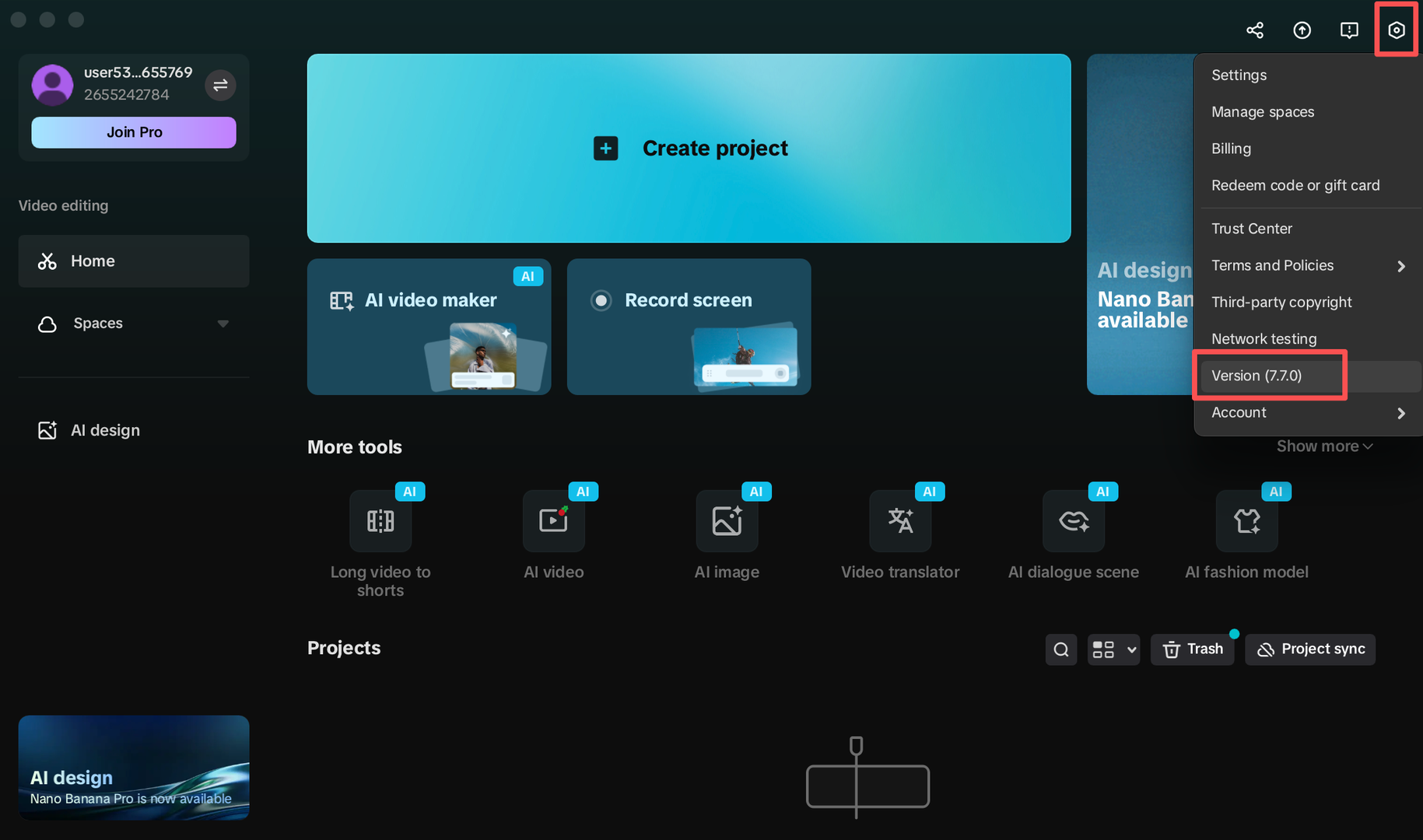
Go to:
Top right profile icon → Settings → Version
If you are on:
-
A beta version
-
A very recent update
-
Or a very old version
That’s likely the cause.
Try this hidden fix that works a lot:
Force refresh the animation library cache
-
Close CapCut completely
-
Press
Win + R -
Paste:
%localappdata%\CapCut\User Data
-
Delete:
-
Cache folder
-
Temp folder
-
-
Restart CapCut
This forces CapCut to redownload animation assets.
Region / Asset Server Issue
CapCut sometimes loads animations based on region licensing.
Try:
-
Connecting to a different internet network
-
Turning VPN ON (try US region)
-
Or turning VPN OFF if you already use one
CapCut users have mentioned that missing Shake animations due to region sync errors.
Check the "Brand Kit" or "Business" Filter
CapCut recently updated its UI. Sometimes animations are hidden because a filter is toggled.
-
In the Animation panel, look for a small dropdown or icons at the top that might say "Business," "Pro," or "Free."
-
Ensure it is set to "All" or "None." If you are accidentally in a specific "Brand" mode, it will hide standard animations like Fade In and Shake.
The "Language Swap" Trick
This is a weird one, but it works for many CapCut UI bugs.
-
Change the app language (e.g., from English to Spanish).
-
The app will restart and rebuild the asset library.
-
Check if the animations appear. If they do, switch back to English. This triggers a refresh of the animation manifest file.
Are You Using the Desktop Version of CapCut?
There are differences between:
-
Mobile version
-
Desktop version
-
Web version
Some animation packs exist only on mobile, and occasionally disappear on desktop during updates.
If you are on desktop:
Try installing the mobile version temporarily and check if Shake 3 appears there. If it does then it is a desktop-side issue.
Advanced Fix (If Nothing Works)
Completely remove residual files:
-
Uninstall CapCut
-
Delete these folders manually:
C:\Users\YourName\AppData\Local\CapCut
C:\Users\YourName\AppData\Roaming\CapCut
-
Restart PC
-
Reinstall latest stable version
A normal uninstall does NOT remove animation asset data.
Why your old projects still show Shake 3
Because:
-
The animation data is embedded in the project file
-
The animation engine still exists
-
But the UI library listing is failing to load
So the animation isn’t deleted but it is just not appearing in the selection menu.
If it is still not fixed…
This could be:
-
A current server-side asset bug
-
A broken animation category index
-
Or an account-based feature flag issue
Can you give us a little more information:
-
Are you on Windows or Mac?
-
What exact CapCut version?
-
Are you using VPN?
-
Did this happen suddenly after an update?
We will provide you more details based on your respnse.